![Prosci-logo-notagline-RGB-white.png]](https://www.prosci.com/hs-fs/hubfs/Prosci-logo-notagline-RGB-white.png?height=40&name=Prosci-logo-notagline-RGB-white.png)
On This Page:
Prework app not showing in Portal
I received an email about completing my prework for the program, however when I log into the Prosci Portal, I don't see Prework. What do I do?
- First, review the email and confirm that you are logging in to the Portal with the same email you registered for the program with. Program tools [Prework, Proxima, etc] are associated with the registration email.
Note: If you have multiple Portal accounts/profiles, confirm you are logging in with the email you registered for the program with and ensure that you are completely logged out of any other accounts/profiles. You can find additional support here on logging out of multiple accounts. - Activated program tools will appear under the My Resources page in the Portal. Please confirm that you are on the My Resources page of the Prosci Portal (see below).
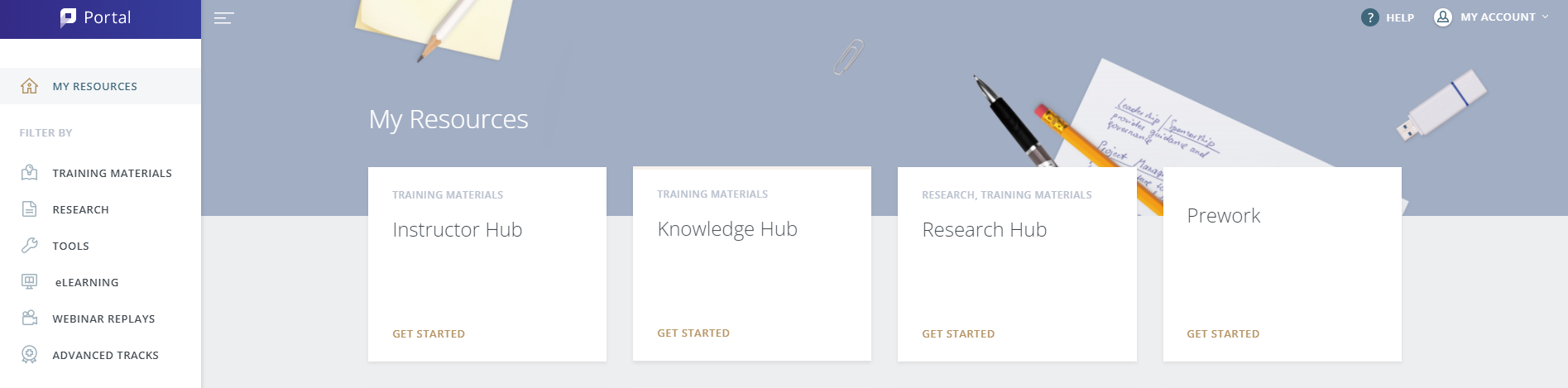
Note: If you are unable to access the My Resources page, ensure that you have completed setting up your Portal account. You can find additional support here on completing your setup.
I am logged into my Prosci Portal account, and when I click on the Prework tile, it doesn't open. What do I do?
If you are having trouble opening the Prework tile, try the following to see if this resolves the issue:
- Try clearing your browser cache.
- Try using a different browser.
If neither of those resolve the issue, contact [email protected].