![Prosci-logo-notagline-RGB-white.png]](https://www.prosci.com/hs-fs/hubfs/Prosci-logo-notagline-RGB-white.png?height=40&name=Prosci-logo-notagline-RGB-white.png)
Available for: Kaiya AI Teams Subscriptions
Navigating the Portal:
1. Login to the Portal: portal.prosci.com (bookmark for later)
-
If you are logging in for the first time, you can review what to expect here
2. To review and add users, go to my "My Account" on the upper right and select "Manage Organization"

How to Add Kaiya:
There are two main ways to assign the Kaiya Suite:
Batch Upload for Multiple UsersIndividually via Manage Users Page
What happens if I go over my seat count?
If you end up going over your seat count , your account will not lock and your existing access will not be impacted.
To discuss adding additional seats to your subscription, connect with your Account Manager to review your options.
How do I know how many seats have been assigned?
On the "Manage Users" page, you will see an "Active Tools" section that you can drop down to review seat assignments.
Batch Upload for Multiple Users:
To see a walkthrough video you can review the below or scroll down for the instructions:
Batch Uploading the Kaiya Suite 🚀 - Watch Video
Step by Step Guide:
1. From your profile, go to "Manage Users" and select "Batch Upload Users"
2. Use the drop down to select "Kaiya Suite" and press download CSV
3. Wipe out the example data in the first row and input the following in your file:
- First Name
- Last Name
- Y for the "Y/N" column
- Leave the expiration override field blank
4. To upload the file, select "Browse"
Note: If you are editing existing users and don't want to send a notification from the portal, you can uncheck the "Send invite email to all email addresses in file" below the upload.
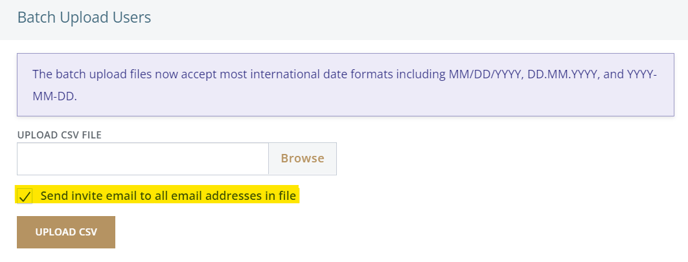 7. Select "Upload CSV"
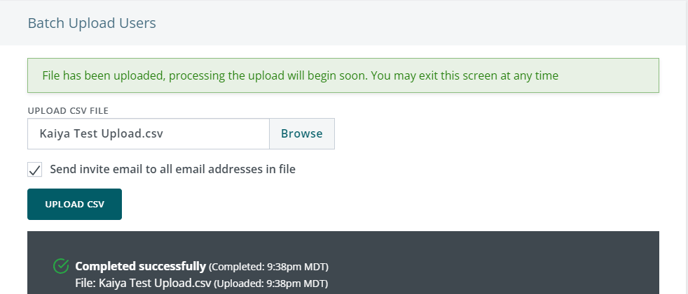
8. You will then see a confirmation message along with a progress bar which will show complete when done.
Below is an example of a successful upload:
Add Individually Via Manage Users Page
You can add new and existing users individually from your manage users page
1. From My Account, find the "Manage Users Page"
2. Locate the "Add Team Member" button at the top and complete the following:
First Name
Last Name
E-mail
Go to Suites and check off Kaiya Suite
3. Once done, select Submit