![Prosci-logo-notagline-RGB-white.png]](https://www.prosci.com/hs-fs/hubfs/Prosci-logo-notagline-RGB-white.png?height=40&name=Prosci-logo-notagline-RGB-white.png)
Availability: Integrate and Equip, OCC and ECM Enterprise License Tiers. Not available for Individual or Single User Licenses
Enablement: License Admins
The Proxima API is a new feature that allows the generation of API keys for Proxima projects. API keys allow users to export key raw data from specific Proxima projects to third party applications that support importing JSON data over a secured API endpoint. This can be useful in creating visuals of the data in tools such as Tableau or PowerBI.
License Admin Enablement
OCC and ECM License Tiers:
In the License Admin Center:
- Navigate to the Apps section
- Find Proxima, ensure it is enabled for the user and click Enable External API
- Note: The [Enable External API] option will only show if Proxima is enabled for the user.
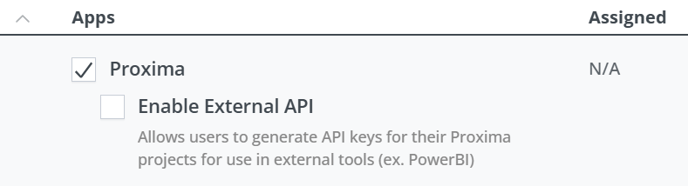
Integrate and Equip License Tier:
In the License Admin Center:
- Navigate to the Apps section
- Find Integrate & Equip
- Click Enable External API
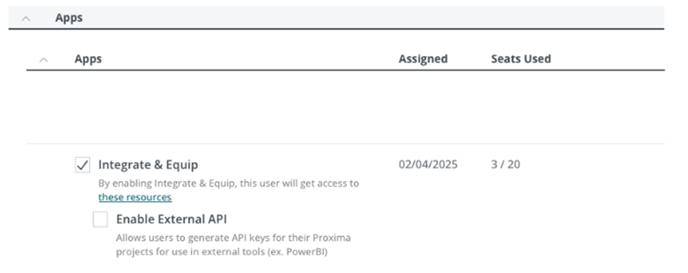
Once enabled, the user will see the API Management feature under the Project Settings page of their Proxima project. Guidance on Generating API Keys can be found below.
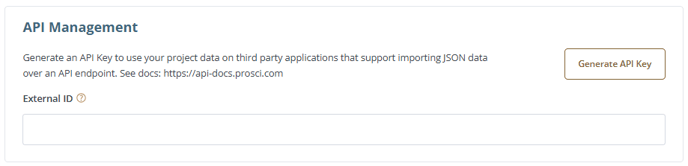
Generating an API Key in Proxima
- Log into Proxima
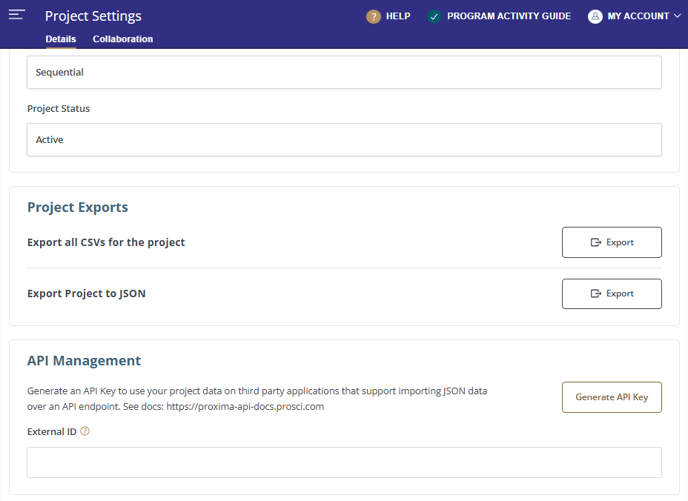
- From the landing page, select a Project and navigate to the Project Settings section.
- Under Details, you will find a section labeled "API Management" Please note, the feature will only show for Project Owners or Administrator collaboration levels.
- To generate an API key, click on the "Generate API Key" button.
- Once generated, the API key will be immediately shown on your screen. It is important to copy and paste the API key right away because it will not be visible if you navigate away from the page and return later.
- If necessary, you can revoke the API key by clicking on the "Revoke API key" button. This will allow you to generate a new key.
API Rate Limits
API rate limiting is a mechanism used to control the number of requests a client can make to an API within a specified time frame.
We currently rate limit any IP address to 300 reqs over a 5 minute period of time. This is a temporarily elevated limit at this time and we fully expect to reduce these limits over time.
For best long-term compliance and performance, we recommend that you build your consuming API's to make fewer than 1 req per second. Proxima projects can be rather large with lots of nested data, and these limits ensure that we can best support all users of our API.
Frequently Asked Questions
Can I generate API keys for all projects at once?