![Prosci-logo-notagline-RGB-white.png]](https://www.prosci.com/hs-fs/hubfs/Prosci-logo-notagline-RGB-white.png?height=40&name=Prosci-logo-notagline-RGB-white.png)
Prosci's SAML-based single sign-on (or SSO) feature will provide your end-users with access to the Prosci Portal and associated applications through an identity provider (IdP) of your choice.
Available for: ECM and OCC License Holders
Set up by: Prosci and Customer Technical Teams
To start using SSO on your account, please contact your Prosci Account Manager for more information on availability and the onboarding process.
Rules
Once SSO is enabled for your account, the following rules apply to end-users:
- The SSO process is applied to the corporate domains that are agreed to during the SSO configuration. Once applied, all end-users with the matching corporate domains must log into the Prosci Portal via the SSO option using their identity provider credentials.
- If an end-user in the system with the matching corporate domain is outside your License Account, they are still required to log in via SSO as soon as the feature is enabled. However, they will not immediately be added to your License.
- End-users are not allowed to change their email address or password in the Prosci Portal once enabled. This data is instead automatically attributed by your identity provider upon successful login.
Configuring SSO
We use a SAML-based SSO approach, so feel free to use any identity provider that supports SAML. To get started on the configuration, please reach out to your Prosci Account Manager.
SCIM, Just-in-time Provisioning, and Single Log Out are not supported at this time.
Frequently asked questions
When we turn on SSO, are users automatically logged out and forced to log in via SSO?
The users will remain logged in and able to use the Prosci Portal. If a user logs out or their session expires, that the user will then be forced to authenticate via SSO.
Do you offer Just-in-time Provisioning (JIT)?
At this time, no. If a new end-user with a matching corporate domain on your account tries to login through the Portal Login flow, they will receive an error message and be directed to reach out to the License Admin on your account to be granted access (see image below). With that said, users can still go through the provided Self Signup link on your account and will be granted just-in-time access.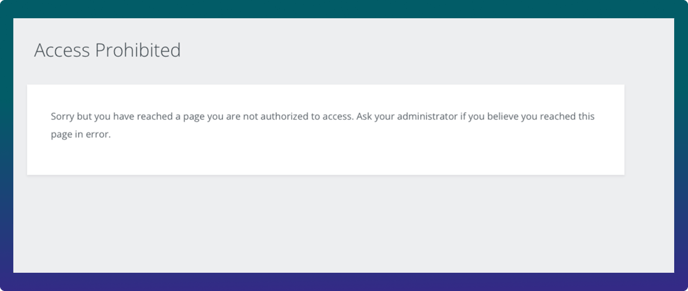
When we enable SSO, will end-users in my License Account that do not have an email address matching our corporate domain still be able to access the Prosci Portal?
Yes, those users will not be impacted and will be able to login with their own email and password credentials. However, once SSO is enabled on your account, you will no longer be able to add users to your License Account that do not match your verified corporate domains.
Where are identity related credentials stored?
We use Auth0 from Okta as our customer authentication service. While specific password related credentials on a given user record will be stored within your own IdP once SSO is enabled, we do store your SAML SSO configurations in our Auth0 tenant in the United States.
We currently use a shared admin account for the Prosci Portal. Will we still be able to use SSO with that setup?
No. It's possible you were setup in our Portal Admin before we had the capability of having multiple License Admin accounts. We support that feature now, so if your organization would like to use SSO we will update your Organization to have multiple Admin accounts that attribute to individuals (there are no costs associated with this change). The reason shared accounts will likely not work is because of how most IdPs are setup - you would need to have that shared account added to your Organization's IdP and that could be problematic.
Once SSO is setup will an existing user’s password change or will they be required to set up a new password?
No, since their password will now be whatever they are using in your IdP. Any password they had previously created for the Prosci Portal would no longer be applicable, since we will be redirecting users to login through your IdP.
Will SSO automatically transfer someone with that e-mail domain into our license account?
No, for data privacy reasons we can not do that at this time. That said, it will force all users with that email to login via the SSO flow, regardless of whether or not they are part of that license or not.